Related Links
- Developer's Guide
- Endpoints and Access Keys
- Third-Party Tools
- Veeam®
- Veeam® 12 Direct-to-Cloud
- MSP360
- MSP360 Cloudberry
- MSP360 CloudBerry Explorer
- MSP360 Managed Backup Service
- Ahsay
- Acronis Cyber Protect Cloud
- Anchorpoint
- AirLiveDrive
- Archiware P5
- Arcserve
- Arcserve ImageManager
- Arq Backup
- BackupAssist
- Bunny.net
- ChronoSync
- Cohesity
- Cloudmounter
- Cloudflare
- Comet
- Commvault
- Couchbase
- cPanel Backup
- CrossFTP
- CuttingRoom
- CubeBackup
- Cyberduck
- Dell
- Dropshare
- Duplicacy
- Duplicati
- EditShare
- ExpanDrive
- Fastly CDN
- Files.com
- Filezilla Pro
- Flexify.IO
- GoodSync
- Hammerspace
- Hedge OffShoot
- Hitachi Content Platform
- iconik
- Iperius Backup
- iRODS
- Jet Backup5
- LucidLink
- Milestone XProtect
- Mountain Duck
- MultCloud
- /n software S3 Drive
- NAKIVO Backup and Replication
- Nextcloud
- Next3 Offload
- NirvaShare
- NovaBACKUP
- odrive
- Photos+ Cloud Library
- PureStorage
- qBackup
- QNAP
- Quest Rapid Recovery
- Rclone
- Restic
- Retrospect
- S3 Browser
- S3cmd
- S3Drive
- s5cmd
- S3FS
- SFTPCloud
- SimpleBackups
- Snowflake
- SyncBackPro
- Syncovery
- Synology Hyper Backup
- Synology Cloud Sync
- Transmit
- TrueNAS® CORE
- UpdraftPlus Backup
- Vantage Gateway
- Veeam® Backup for Microsoft 365
- Vembu BDR Suite
- Veritas Backup Exec
- WinSCP
- Windows Network Drive
- CNAME Record Guide
- API Documentation
Use S3cmd with IDrive® e2
S3cmd is a free command line tool and client, used to upload, restore, and manage data in Amazon S3 and other S3-compatible cloud object storage providers. Learn more about using S3cmd.
Prerequisites
Before using S3cmd to connect your IDrive® e2 account, you require:
- An active IDrive® e2 account. Sign up here if you do not have one.
- A bucket in IDrive® e2. See how to create a bucket.
- Valid Access Key ID and Secret Access Key. Learn how to create an access key.
- A license for Precog.
- The S3cmd command line tool should be installed on your system.
Configure S3cmd with IDrive® e2
- In the command prompt, enter the following command:
Run s3cmd --configure Enter the following information:
- In the Access Key field, enter your IDrive® e2 Access Key ID.
- In the Secret Key field, enter your IDrive® e2 Secret Access Key.
- Enter the region selected during the creation of the key or keep it empty.
- In the S3 Endpoint, enter the Endpoint Access URL.
- For DNS-style bucket+hostname:port template for accessing a bucket, enter Endpoint Access URL.
- Leave all other prompts empty and press enter.
- You can see the following settings.
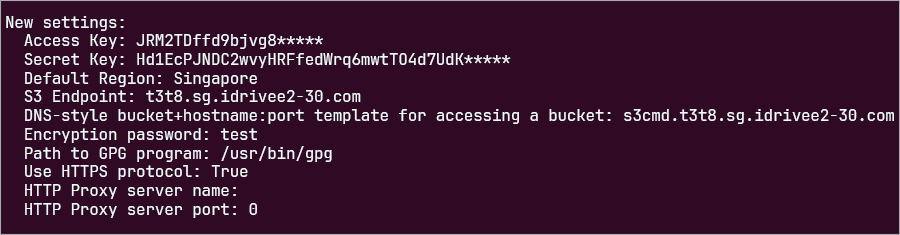
You can now use S3cmd to upload/download data on IDrive® e2 hot cloud storage.
Note: IDrive® e2 does not allow creating public buckets. Only public buckets created before 21st July, 2026 are available.